
The fastest way to start a WordPress site is the WordPress® box on your hosting service page in the Client Area. You don't need to log in to cPanel.
Install WordPress
- Log in to the Client Area, go to Services > My Services and open your hosting service.
- Scroll to the WordPress® box. Under Create New you'll see the address your site will use.
- Fill in the fields and click Install.
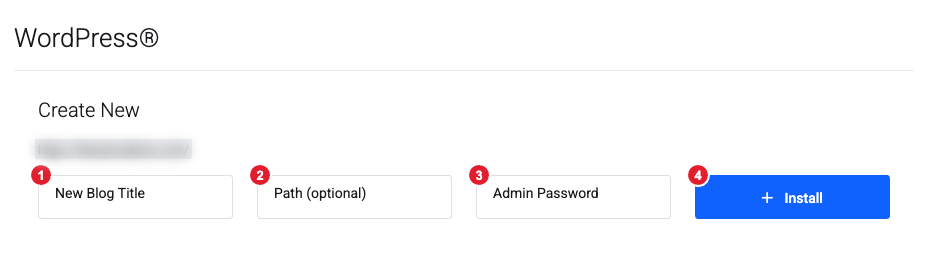
(1) New Blog Title: your site name, which you can change later in WordPress (2) Path (optional): leave empty to install at your main address, or enter a folder such as blog to install at yourdomain.com/blog (3) Admin Password: the password for your WordPress admin login (4) Install
The address preview above the fields updates as you type a path. Installation can take a minute, so leave the page open. When it finishes, a Success! message shows links to Visit your new site or go to its Admin Area.
Manage your WordPress sites
Once a site is installed, the WordPress® box lists your installations. Choose one from the menu, then click:
- Go to Website to open the site, or
- Admin to go straight to the WordPress dashboard.
Sites installed here also appear in WordPress Management in cPanel. Use that for updates, backups, security settings, plugins and themes, and to see or change the admin username: see Install and Manage WordPress with WP Toolkit.
Moving an existing site instead? See Move a WordPress Site to Your Hosting. Need help? Open a support ticket.
