
When a visitor opens a page that doesn't exist, they see a plain "404 Not Found" message from the web server. With Error Pages you can replace it with your own page, for example one with your logo and a link back to your home page.
- Log in to the Client Area, go to Services > My Services and open your hosting service.
- Click Log in to cPanel in the menu on the left.
- In cPanel, click Error Pages. You can also type its name into the Search Tools box at the top.
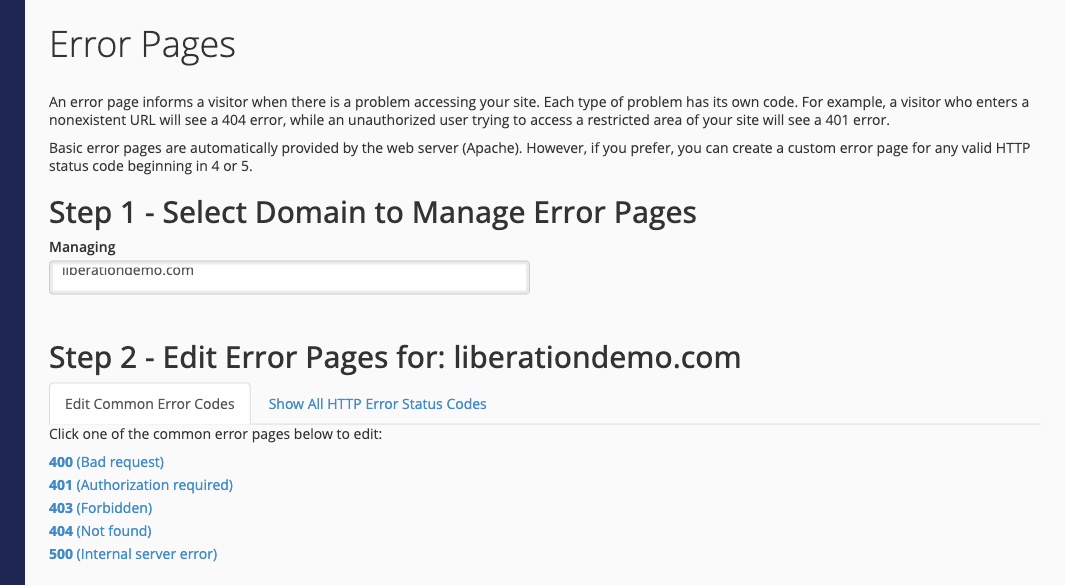
- In Step 1, choose the domain in the Managing list.
- In Step 2, click the error you want to customize. 404 (Not found) is the one visitors see most. Click Show All HTTP Error Status Codes for the full list.
- Type or paste the HTML for your page into the editor. The buttons above the editor insert useful details, such as the address the visitor asked for or the page they came from.
- Click Save.
Test it by opening a made-up address on your site, such as yourdomain.com/test-404.
Tip: cPanel saves the page as a file such as 404.shtml in the domain's folder, so you can also edit it later in File Manager. If your site runs on WordPress, your theme usually shows its own 404 page instead, and you change that in WordPress.
