
For some new orders we ask you to confirm your phone number with a one-time code sent by text message. It's a quick security check that protects you and us from fraudulent sign-ups. Most customers are never asked.
When will I be asked?
Only when an order needs an extra check, for example when it's placed from a new account. If you're asked, the Add Your Number page opens, and you can't continue until your number is verified. Customers who already had an account before this check was introduced aren't asked.
Verify your number
- On the Add Your Number page, enter your mobile number in local format, for example
8135551234for a US number. Don't type the + or your country code. They're added automatically. - Click Add Number. We text a 6-digit code to that number.
- Enter the code to finish. You can then carry on with your order.
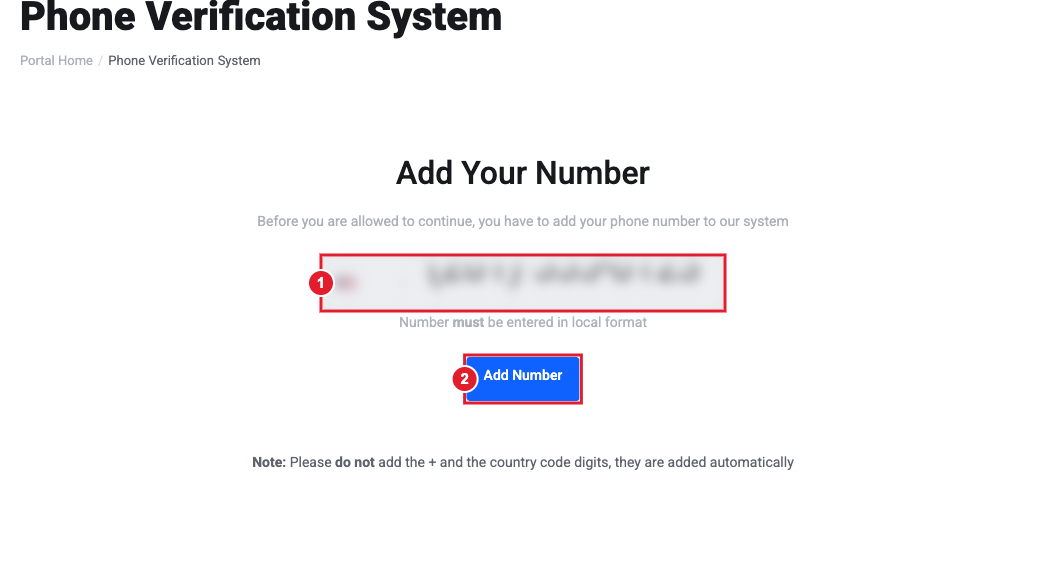
(1) Your mobile number, in local format (2) Add Number
Didn't get the code?
- Wait a minute. Texts can take a moment to arrive.
- Check that the number, and the country on your account, are correct.
- You have a limited number of attempts. If you run out, open a ticket and we'll verify you manually.
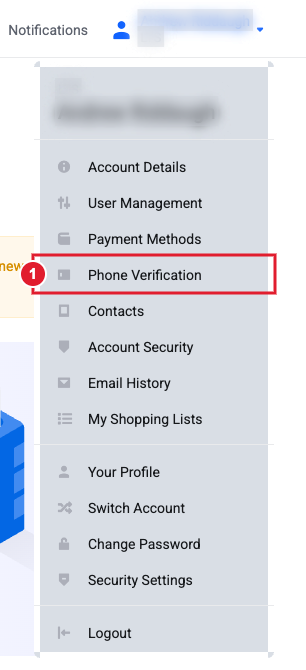
You can also reach this page any time from your name (top right) > Phone Verification.
Still need help?
Tell us your country and the number you tried. Open a support ticket and include the details listed above so we can resolve it on the first reply.
