
You can pre-pay money into your account as credit. New invoices are then paid from your credit automatically, which saves lots of small card charges and means a renewal is never missed.
Add funds
- Log in to the Client Area and go to Billing > Add Funds.
- Choose your Payment Method.
- Pick an Amount to Add ($10, $25, $50, $75 or $100).
- Click Add Funds and complete the payment on the invoice that opens.
Once that invoice is paid, the amount shows as credit on your account.
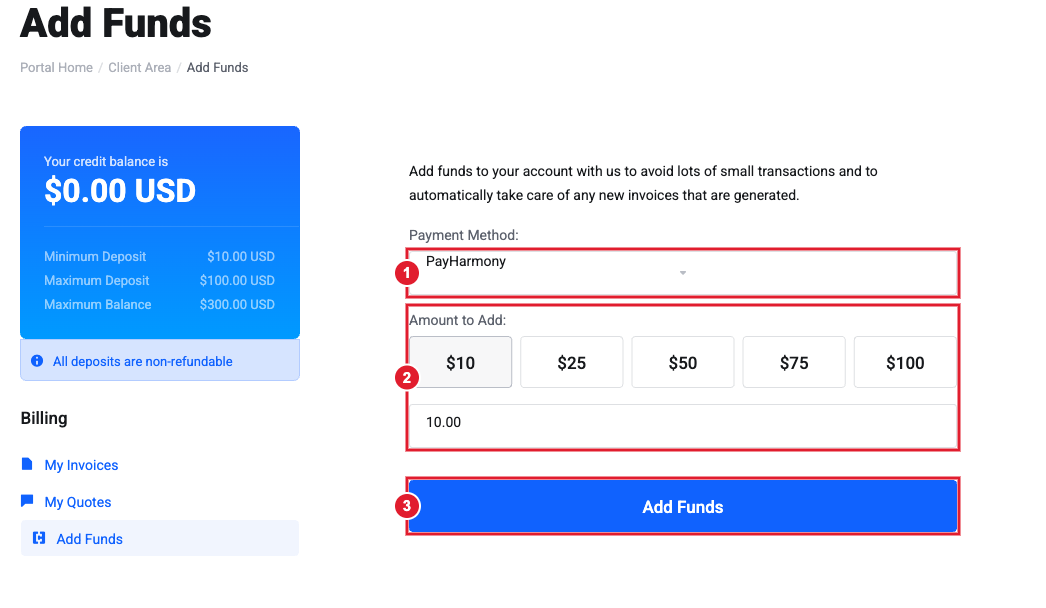
(1) Payment Method (2) Amount to add (3) Add Funds. Your current credit balance and deposit limits are shown on the left.
Important: Each deposit must be between $10 and $100, and your credit balance can hold up to $300. Deposits are non-refundable. They can only be used to pay invoices from us.
How credit is used
- New invoices are paid from your credit automatically, as far as the balance covers them.
- If an invoice is more than your credit, the credit is applied first and the rest is charged to your card or left for you to pay.
- Refunds and overpayments can also be left on your account as credit. Just ask in a Billing ticket.
Pay several invoices at once
If you have two or more unpaid invoices, Billing > Mass Payment combines them into one payment.
Tip: Paying a year or more up front instead? Most plans are cheaper on annual billing. Ask Sales to switch your billing cycle.
Still need help?
Choose the Billing department and include any invoice numbers. Open a support ticket and include the details listed above so we can resolve it on the first reply.
