
Your Client Area at secure.liberationtek.com is where you manage everything you have with Liberation: services, domains, invoices, support tickets and the people who can access your account. This guide shows what's on each screen so you can find things quickly.
Your dashboard
After you log in you land on My Dashboard. It shows:
- Four summary boxes: Services, Domains, Unpaid Invoices and Tickets. Click any box to open that list.
- Your Active Products/Services: each service with its status and a Manage button. Hosting plans also have shortcuts to log in to cPanel and Webmail.
- Recent Support Tickets and, if you're an affiliate, your Affiliate Program balance.
- Your account card: your name and billing address, with an Update button. Below it are your Contacts and Shortcuts (order new services, register or transfer a domain).
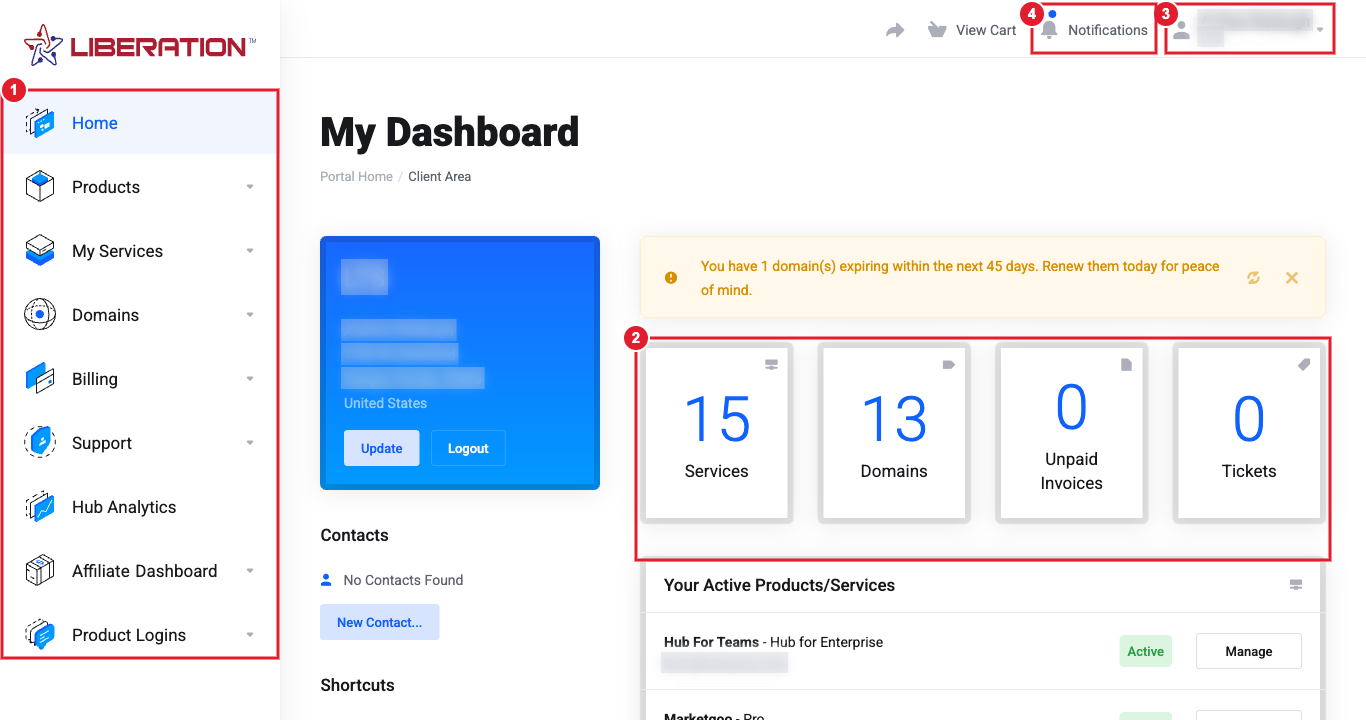
(1) The left-hand menu (2) Summary boxes (3) Your account menu (4) Notifications
The left-hand menu
| Menu | What you'll find |
|---|---|
| Home | Back to your dashboard. |
| Products | Order new services: hosting, Hub for Teams, email, Site Builder, SSL, domains and more. |
| My Services | Every service on your account, and Order New Services. |
| Domains | My Domains, Domain Renewals (renew early), Register a New Domain and Transfer Domains to Us. |
| Billing | My Invoices, My Quotes, Mass Payment, Payment Methods and Add Funds (prepaid credit). |
| Support | Tickets, Open Ticket, the Knowledgebase, Announcements, Downloads and Network Status. |
| Hub Analytics | Opens Liberation Analytics, for customers who have the Analytics service. |
| Affiliate Dashboard | Your referral link and commissions. See Affiliate program: how to join, earn commission and request a payout. |
| Product Logins | Quick links to sign in to Hub for Teams / Liberation Email and Liberation Campaign. These use their own passwords, not your Client Area password. |
Your account menu (your name, top right)
Click your name in the top-right corner to manage your account and login:
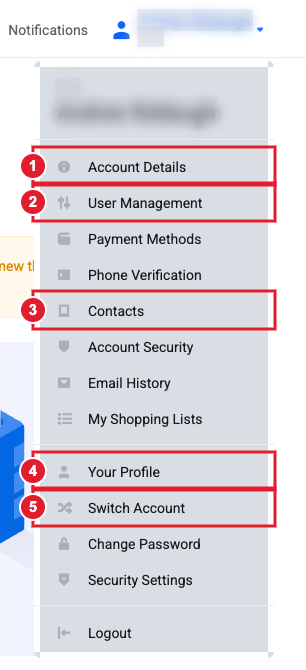
(1) Account Details (2) User Management (3) Contacts (4) Your Profile (5) Switch Account
- Account Details: company, billing address, phone, language and email preferences.
- User Management: invite people to help manage your account.
- Payment Methods: add or replace a card.
- Contacts: people who receive copies of emails but can't log in.
- Email History: every email we've sent you.
- Your Profile, Change Password and Security Settings: your own login, password and two-factor authentication.
- Switch Account: move between accounts if your login has access to more than one.
Each of these has its own guide. See Your login vs. your account: Profile, Account Details, Users and Contacts explained and How to secure your Client Area account.
Common tasks: where to go
- Pay an invoice: Billing > My Invoices.
- Update your card: Billing > Payment Methods.
- Log in to cPanel or Webmail: My Services > your hosting plan > Log in to cPanel.
- Change nameservers or DNS: Domains > My Domains > your domain.
- Cancel something: My Services > the service > Request Cancellation.
- Get help: Support > Open Ticket.
Still need help?
Open a support ticket and include the details listed above so we can resolve it on the first reply.
