
Our affiliate (partner) program pays you for referring new customers to Liberation. This guide shows where to find your referral link, how commission works, and how to get paid.
Find your affiliate dashboard and referral link
- Log in to the Client Area.
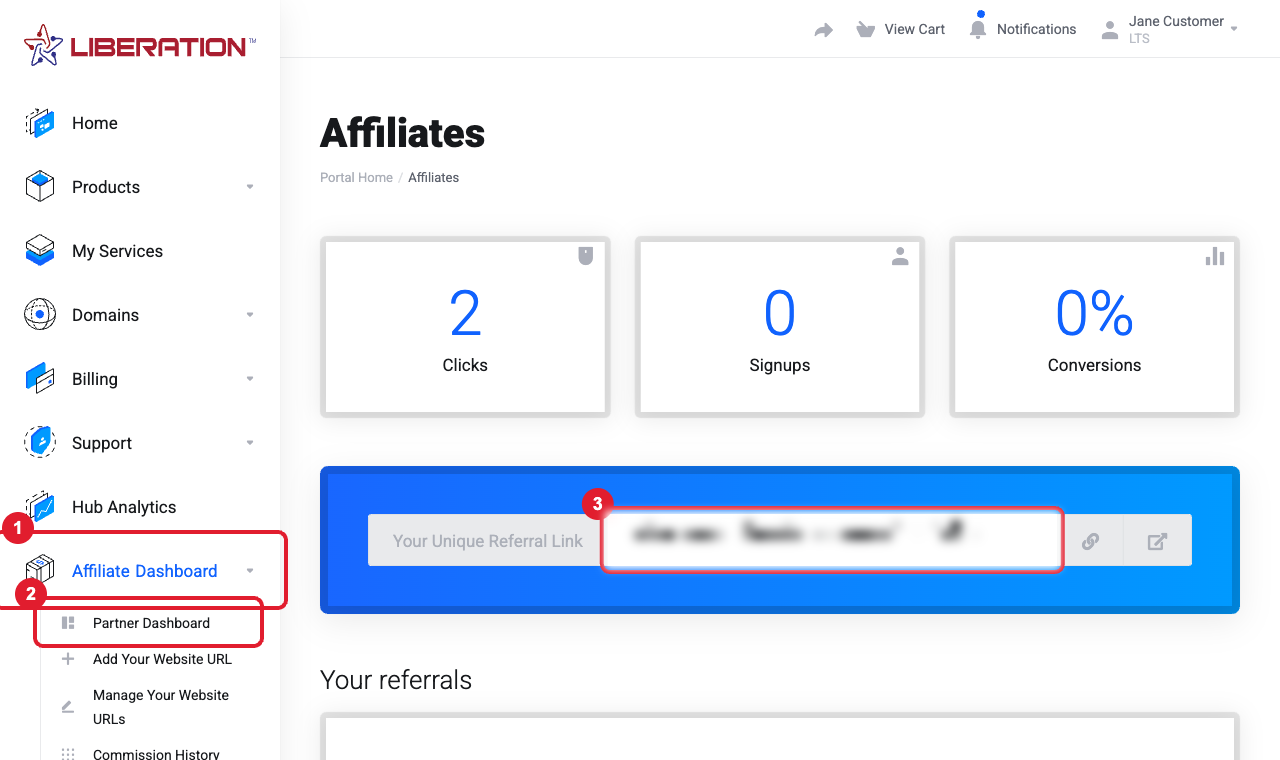
- Click (1) Affiliate Dashboard in the left menu, then (2) Partner Dashboard.
- Copy (3) Your Unique Referral Link and share it on your website, in emails or on social media. The dashboard also shows your clicks, signups and conversions.
Not an affiliate yet? If you don’t see the dashboard, open a Sales ticket asking to join and we’ll activate your affiliate account (usually within one business day). The option then appears in your left menu.
How you earn
- You earn 10% recurring commission each month on the services your referrals pay for, for as long as they remain customers.
- A referral is tracked when the customer signs up through your referral link. Ask new customers to use it before they order.
- You can also register your own website under Add Your Website URL so links from it are credited to you.
- Referred someone who ordered without your link? Open a ticket with their name or company and we can add them to your account.
Check your commission and request a payout
- Open Affiliate Dashboard > Commission History to see what you’ve earned and when each commission clears.
- Go to Affiliate Dashboard > Commission Payouts. Once your available balance reaches the minimum payout shown there, request a withdrawal.
- We’ll contact you to confirm how you’d like to be paid (bank transfer or a mailed check). Payouts are sent within a few business days of confirmation.
Tip: Signing up a client yourself? Open a Sales ticket with the client’s name, company, email, phone and address. We’ll create their account under your referral and can add you as a user on it.
Still need help?
Choose the Sales department for affiliate questions. Open a support ticket and include the details listed above so we can resolve it on the first reply.
