
Every Liberation hosting plan includes a free SSL certificate that is issued and renewed automatically (AutoSSL). You don't need to buy one for the padlock to appear. If your site shows "Not secure" or a certificate warning, one of the causes below is almost always to blame.
Check your SSL status
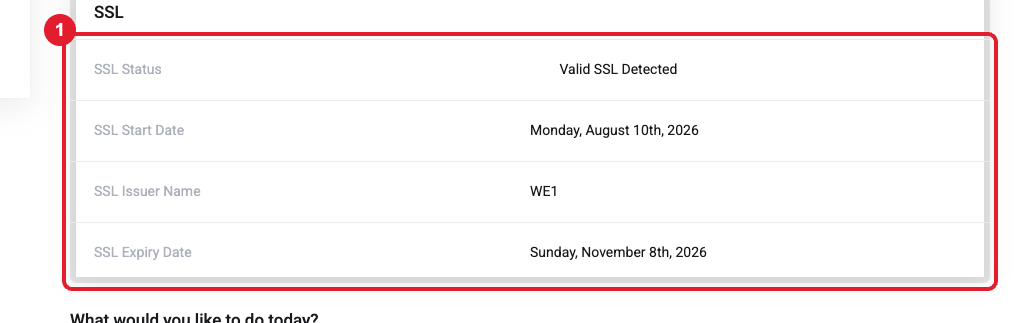
In the Client Area, open Domains and click your domain. The overview shows the (1) SSL Status, issuer and expiry date.
Common causes and fixes
| Situation | Fix |
|---|---|
| You just moved the site or changed DNS/nameservers | AutoSSL can only issue a certificate after the domain points to our server. Wait a few hours after the DNS change, then run AutoSSL again (how to run AutoSSL) or open a ticket and we'll run it. |
| The domain points somewhere else (another host, Wix, Squarespace, a parked page) | We can only secure sites that we host. Point the domain’s A record or nameservers to your Liberation hosting, or install SSL at the other provider. |
| Padlock missing but no error ("mixed content") | The page loads some images or scripts over http://. In WordPress, go to Settings > General and make sure both addresses start with https://. A plugin like Really Simple SSL can fix leftover links. |
| Works for www but not without it (or the reverse) | Both versions need DNS records pointing to the hosting. Add the missing www CNAME or @ A record, then re-run AutoSSL. |
| You bought a paid SSL (e.g. RapidSSL) and it isn't active | The certificate authority emails the domain contact (for example [email protected]) a validation link. Click it to approve issuance. Didn't get it? Open a ticket and we'll resend or switch to DNS validation. |
| Using Cloudflare | Set Cloudflare’s SSL mode to Full or Strict. See the Cloudflare article. |
Tip: Do I need to buy an SSL? For most websites, no. The free certificate provides the same encryption. Paid certificates add organization validation or a warranty, and they must be renewed yearly with the certificate authority.
Still need help?
Include your website address and a screenshot of the browser warning. Open a support ticket and include the details listed above so we can resolve it on the first reply.
