
If a domain expires, your website and your email stop working, because all of the DNS settings go with it. This guide explains how renewals work and what to do if a domain has already expired.
How renewals work
- When Auto Renew is on, a renewal invoice is created about 14 days before the expiry date and emailed to you.
- If you have a card on file, the invoice is charged automatically on its due date. Otherwise, pay it from Billing > My Invoices.
- The domain renews as soon as the invoice is paid. You can pay early at any time.
Check or change Auto Renew
- Open Domains in the Client Area and click the domain.
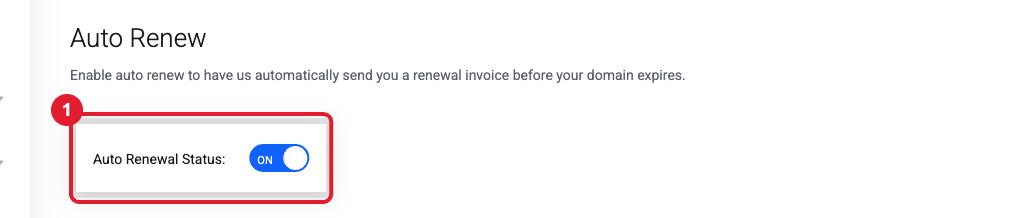
- Click Auto Renew in the Manage menu. (1) shows ON when the domain will renew automatically.
Renew now (or for several years)
- Go to Domains, click the … menu next to the domain and choose Renew, or use Domain Renewals.
- Pick the renewal period (1 year, 2 years, and so on), add it to the cart and check out.
Tip: Why is the cart total $10 higher than the renewal price? That is ID Protection (WHOIS privacy), which keeps your personal details out of public domain records. It’s optional. If you don’t want it, open a ticket and we’ll switch it off before you pay.
My domain already expired
- Renew it right away from Domain Renewals or by paying the open invoice. Most domains can be renewed at the normal price for a short grace period after expiry.
- After payment, it can take a few hours for your website and email to come back while DNS updates worldwide.
- If the renewal doesn't go through or the domain is past the grace period, open a ticket right away. Domains in the redemption period can still be recovered, but the registry charges a restore fee.
Important: Paid but the Client Area still says the domain is expiring? This happens when a payment (often a PayPal subscription) wasn’t linked to the renewal invoice. Open a Billing ticket with your receipt and we’ll apply it.
Don't want to renew?
Turn Auto Renew off and let the domain expire. You'll still get reminder emails; you can ignore them. See How to cancel a service or stop a domain from renewing.
Still need help?
Open a support ticket and include the details listed above so we can resolve it on the first reply.
