
This guide covers moving a domain to Liberation from another registrar, and moving one away. Most failed transfers come down to one of three things: the domain is locked, the authorization (EPP) code is wrong, or the domain is inside the 60-day transfer lock.
Transfer a domain to Liberation
- At your current registrar (GoDaddy, Wix, Squarespace, etc.):
- Turn off the domain/registrar lock.
- Turn off privacy / ID protection for now (you can turn ours on afterwards).
- Make sure the registrant email address is one you can receive mail at.
- Request the authorization code (also called EPP code, auth code or transfer key).
- In our Client Area, go to Domains > Transfer Domains to Us (direct link), enter the domain and the authorization code, and check out. A transfer includes a one-year renewal.
- Watch for an email asking you to approve the transfer and click the link. Some registrars also let you approve it from their dashboard to finish sooner.
- Transfers usually complete within 5–7 days. Your website and email keep working during the transfer because the existing DNS stays in place.
Important: The 60-day lock: domains can't be transferred for 60 days after they are registered, transferred, or after the registrant's name, organization or email changes. This rule comes from ICANN and no registrar can override it. See 60-Day Transfer Lock After Change of Registrant.
Transfer a domain away from Liberation
- Open the domain in the Client Area and click Registrar Lock. Switch (1) Registrar Lock Status to OFF.
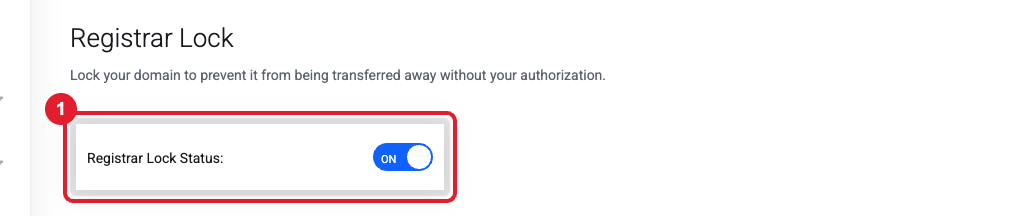
- Click Get EPP Code. Depending on the domain extension, the code is shown on screen or emailed to the registrant email address on the domain.
- Start the transfer at the new registrar using that code, then approve the confirmation email.
Troubleshooting
- "An issue was encountered while updating the domain lock status." This usually means the domain is in the 60-day lock, or your account profile is missing a billing address or phone number (the registry needs complete contact details). Update Account Details, then try again, or open a ticket.
- Transfer failed / was rejected. Check that the lock and privacy are off at the old registrar and the code was copied exactly. Then ask us to retry.
- Transfer is "pending" for days. Ask the old registrar to release (approve) it. This speeds it up.
More detail: How to lock / unlock your domain · Send my Auth / EPP code
Still need help?
Include the domain name and the error message you received. Open a support ticket and include the details listed above so we can resolve it on the first reply.
