
DNS records connect your domain to your website, email and other services. You'll need to add or change a record when you connect a website built elsewhere, verify your domain with Google or Microsoft, or set up email sending for a service like Liberation Campaign.
Tip: This page works when your domain uses our default nameservers (
dns1/dns2/dns3.liberationtek.com). If your domain uses cPanel (ns1/ns2.liberationtek.com) or Cloudflare, edit records there instead. See Which nameservers should my domain use?Add a DNS record
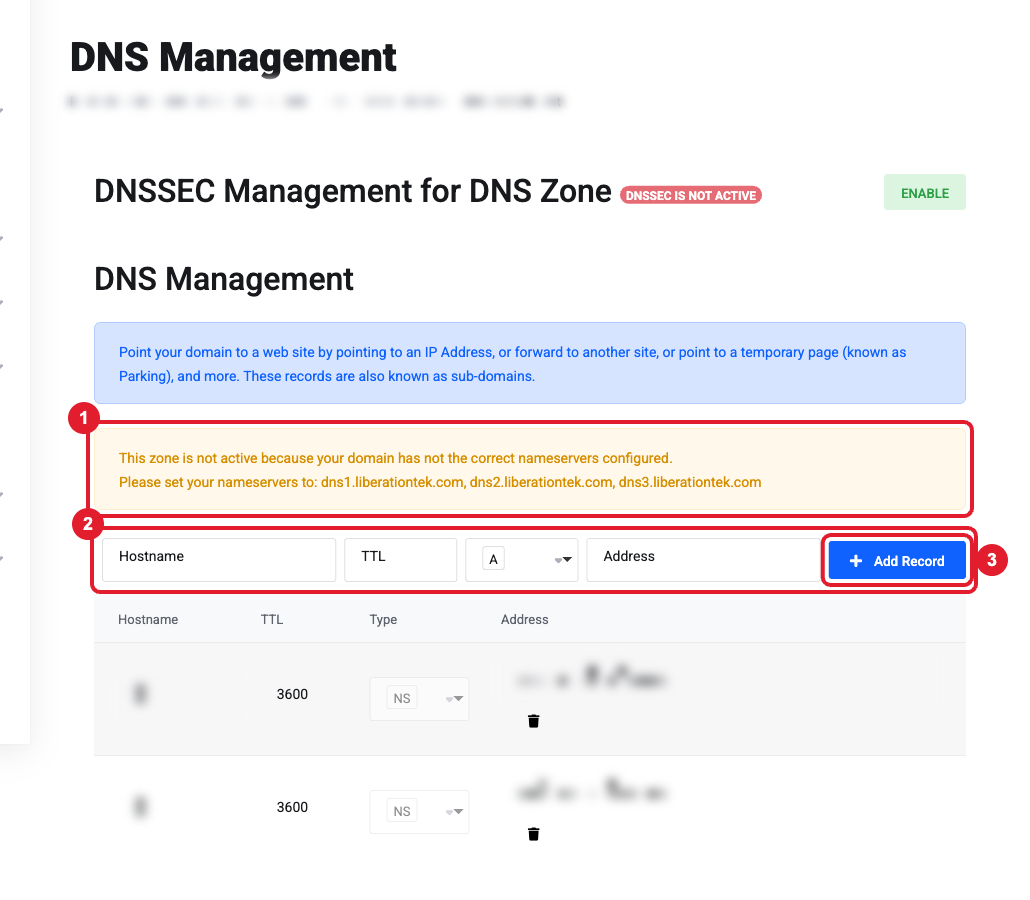
- In the Client Area, open Domains, click your domain, then click DNS Management in the Manage menu.
- If you see a yellow message (1) saying "This zone is not active because your domain has not the correct nameservers configured", your domain is using different nameservers. Either switch to the default nameservers, or make your changes wherever your DNS is actually hosted.
- In the top row (2), fill in:
- Hostname:
@for the domain itself (yourdomain.com), or a prefix such aswww,mailorlink. - TTL: leave at 3600 unless told otherwise.
- Type: A, CNAME, MX, TXT, etc.
- Address: the value you were given (an IP address, a hostname, or a text string).
- Hostname:
- Click (3) Add Record, then scroll down and click (4) Save Changes.
Common records and what they're for
| Type | Used for | Example |
|---|---|---|
| A | Points a name to a server IP (your website) | @ → 203.0.113.10 |
| CNAME | Points a name to another hostname | www → yourdomain.com |
| MX | Where your email is delivered (needs a priority) | @ → mx1.liberation.email (10) |
| TXT | Verification codes, SPF, DKIM, DMARC | @ → google-site-verification=… |
Rules that prevent most problems
- Only one SPF record. A domain may have just one TXT record starting with
v=spf1. To allow another service, add itsinclude:to the existing record rather than creating a second one. - Only one DMARC record. Two
_dmarcrecords cause some providers (Microsoft, Yahoo) to reject your email. - Remove old MX records. When you move email to a new provider, delete the previous provider's MX records. Leftover MX records (including a default one that points to your own domain) cause random missing emails.
- Copy values exactly. Include every character. Some DKIM keys are very long.
How long do changes take?
Usually 15 minutes to a few hours, and up to 24 hours worldwide. Check progress at dnschecker.org (choose the record type and enter your domain).
Still need help?
Paste the exact records you were asked to add, or a screenshot of the instructions from the other service. Open a support ticket and include the details listed above so we can resolve it on the first reply.
