
Nameservers tell the internet where to find your domain's DNS records, the settings that point your website and email to the right place. Using the wrong nameservers is the most common reason a website or email stops working after a change. Your domain must use one of the sets below. Never mix them.
Which nameservers should I use?
| If your DNS is managed… | Use these nameservers |
|---|---|
| In the Client Area (Domains > DNS Management). Most email-only and Hub for Teams customers. | dns1.liberationtek.comdns2.liberationtek.comdns3.liberationtek.comTip: choose "Use default nameservers" to set these automatically. |
| Inside your cPanel hosting account (Zone Editor) | ns1.liberationtek.comns2.liberationtek.com |
| By our Cloudflare CDN service | The two Cloudflare nameservers shown on the Cloudflare Overview page (for example name.ns.cloudflare.com) |
dns1.liberationtek.com + ns1.liberationtek.com). Each set holds a different copy of your records, so mixing them makes your website and email work only some of the time.Change your nameservers
- In the Client Area, open Domains and click your domain.
- Click Nameservers in the Manage menu.
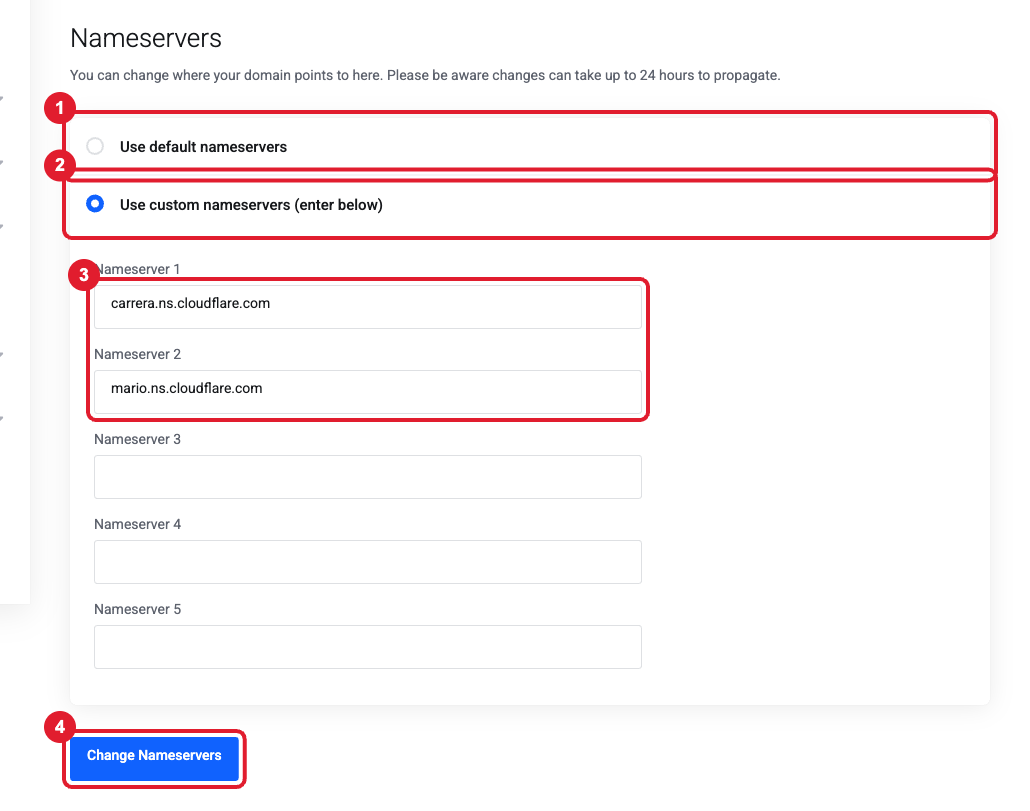
- Choose (1) Use default nameservers to use our Client Area DNS (dns1-dns3.liberationtek.com), or choose (2) Use custom nameservers and type the nameservers (3) you were given (for cPanel hosting or Cloudflare).
- Click (4) Change Nameservers.
Nameserver changes can take up to 24 hours (occasionally 48) to spread across the internet. During that time some visitors may still see the old settings. You can watch the progress at dnschecker.org.
My domain is registered somewhere else (GoDaddy, Namecheap, Wix, Squarespace…)
You have two options:
- Point the nameservers to us: log in at your registrar, find Nameservers / DNS settings, choose custom nameservers, and enter the set from the table above.
- Keep your DNS at the registrar and add only the records we give you (for example the email records in DNS records needed for Liberation Email / Hub for Teams).
Our DNS - Nameservers category has registrar-specific guides for GoDaddy, Namecheap, Name.com and others.
Still need help?
Tell us the domain name and where it is registered. Open a support ticket and include the details listed above so we can resolve it on the first reply.
