
Your Client Area at secure.liberationtek.com is where you pay invoices, manage domains and DNS, open Hub for Teams / email settings, log in to cPanel, and open support tickets. This guide shows how to sign in and what to do if you've forgotten your password.
Important: Your Client Area password is separate from your email (Hub for Teams) password and your cPanel password. Resetting one does not change the others.
Sign in to the Client Area
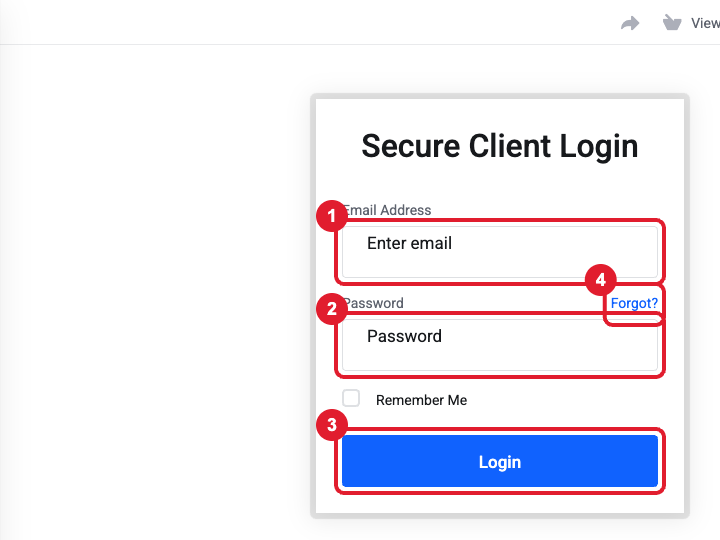
- Go to https://secure.liberationtek.com/clientarea.php.
- (1) Enter the email address on your Liberation account.
- (2) Enter your Client Area password.
- (3) Click Login.
Forgot your password? Reset it
- On the login page, click Forgot? (4) next to the Password field.
- (1) Enter the email address on your account and (2) click Submit.
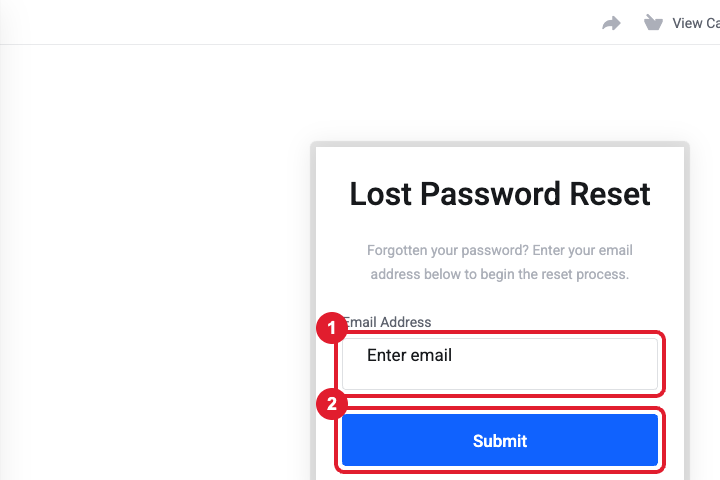
- Open the email titled Password Reset Validation and click the link inside. The link expires after a short time, so use it right away.
- Choose a new password (at least 8 characters with letters, numbers and a symbol) and save it.
Tip: Not seeing the reset email? Check your Spam/Junk folder, and make sure you used the same email address you used when you signed up. If you have several accounts with us, each one uses its own email address.
Common problems
- "Please verify your email address" banner – open the verification email we sent when you signed up and click the link. From the Client Area you can click Resend Verification Email in the banner.
- Two-factor code lost – if you set up two-factor authentication and replaced or reset your phone, open a ticket from the email address on the account (or call us) and we will verify your identity and disable 2FA so you can set it up again.
- Too many attempts – after several failed logins your IP can be temporarily blocked. Wait 15–30 minutes, then use Forgot? rather than guessing again.
- Logging in for a team member – don't share your login. Invite them as a user instead: Hello, (your name) > User Management > Invite New User.
Still need help?
If the reset email never arrives, Open a support ticket and include the details listed above so we can resolve it on the first reply.
