
An API token lets a script or app manage your cPanel account through cPanel's API without using your password. Only create one if an app or developer asks for it.
- Log in to the Client Area, go to Services > My Services and open your hosting service.
- Click Log in to cPanel in the menu on the left.
- In cPanel, click Manage API Tokens. You can also type its name into the Search Tools box at the top.
- Enter an API Token Name (letters, numbers, dashes and underscores only).
- Choose whether the token should expire. Setting an expiry date is safer.
- Click Create.
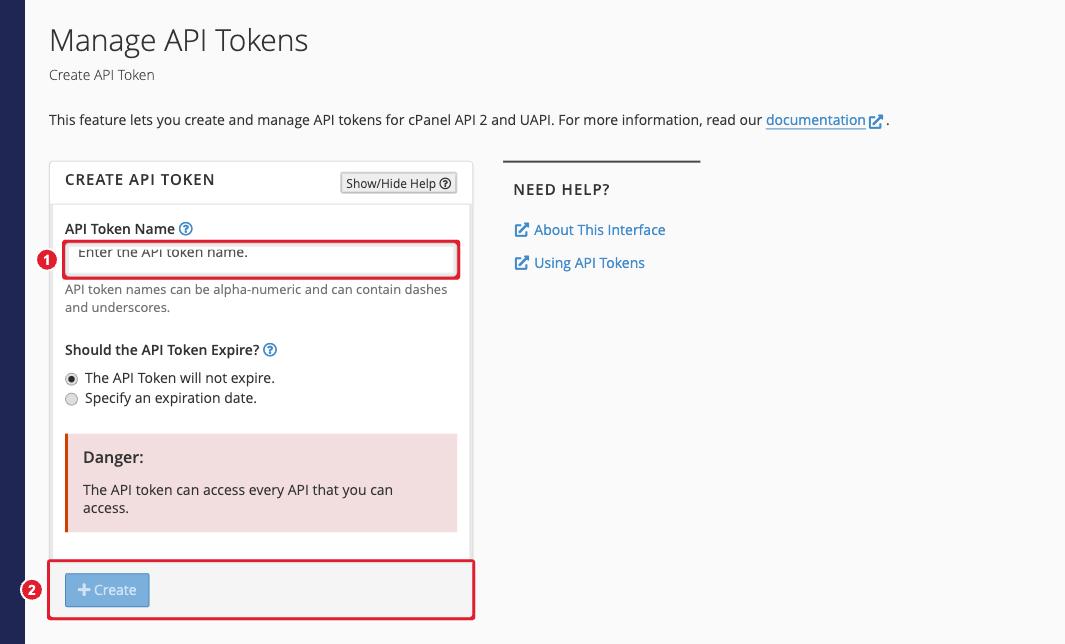
(1) Token name (2) Create
- Copy the token that appears and store it safely. cPanel shows it only once.
Important: A token can do anything you can do in cPanel. Never share it by email or paste it into a website you don't trust. If a token might be exposed, go back to Manage API Tokens, select it and click Revoke.
