
Your personal settings control your profile, password, security and how your Hub looks.
Open your settings
- Log in at hubforteams.com.
- Click your profile picture in the top right and choose Personal settings.
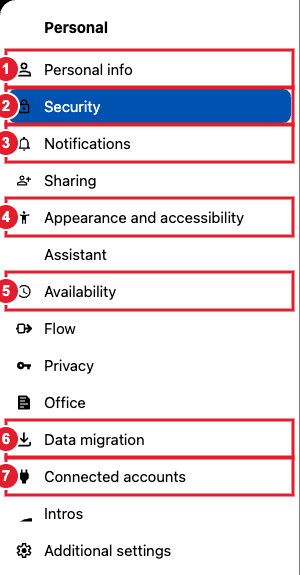
(1) Personal info (2) Security (3) Notifications (4) Appearance and accessibility (5) Availability (6) Data migration (7) Connected accounts
- Personal info: your name, profile picture, email, phone and who can see each detail. See Setting your preferences.
- Security: change your password, turn on two-factor authentication, and see or log out devices. See Resetting Your Password and Using Multi Factor Authentication.
- Notifications: choose what you're notified about, and by email or in the Hub.
- Appearance and accessibility: light or dark theme, background and accessibility options. See How to change the Hub Layout (Light / Dark Mode).
- Availability: your working hours and out-of-office dates. See Setting out-of-office messages.
- Data migration: export a copy of your Hub data, or import data from another account.
- Connected accounts: link Google, Microsoft OneDrive, Dropbox and other services. See Connecting Google Contacts and Calendar.
