
MX (mail exchanger) records tell other mail servers where to deliver email for your domain. To receive email with Liberation Email or Hub for Teams, your domain needs our two MX records, and no others.
The MX records for Liberation Email
| Hostname | Type | Address | Priority |
|---|---|---|---|
| @ | MX | mx1.liberation.email | 10 |
| @ | MX | mx2.liberation.email | 10 |
For the complete set of records (SPF, autoconfig, autodiscover and SRV), see DNS Records Needed for Liberation Email and Hub for Teams. You also need an SPF record so your mail is trusted when you send it. See SPF records.
Add the MX records
- Log in to the Client Area.
- Go to Domains > My Domains and click the domain.
- In the menu on the left, click DNS Management.
- Delete any old MX records first: click the trash icon under each one. Old records from another provider will send some of your mail there.
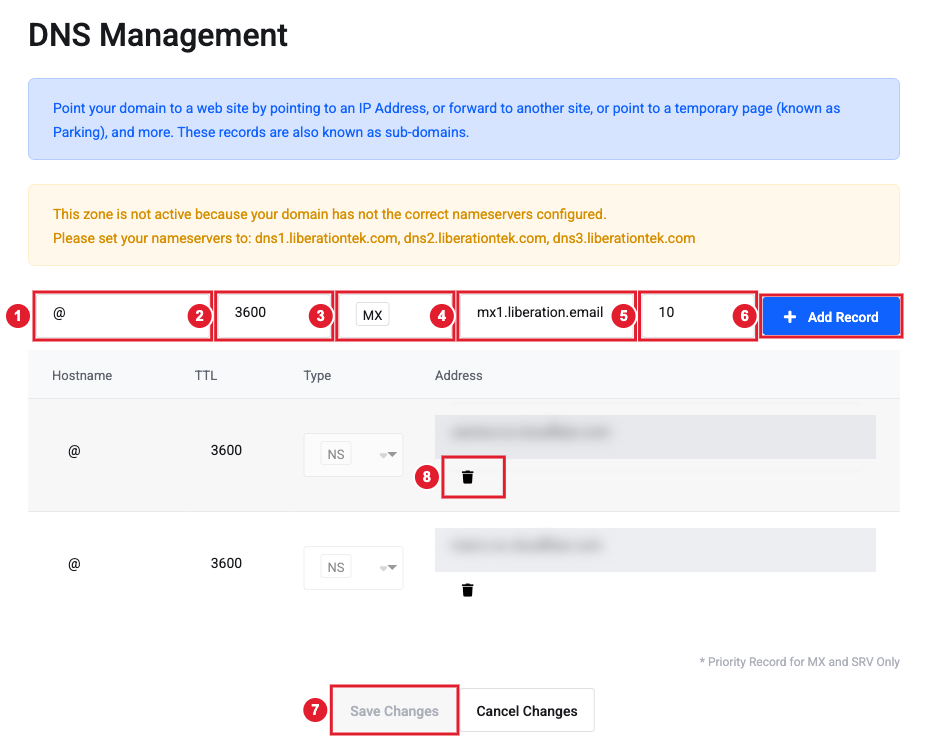
(1) Hostname (2) TTL (3) Type (4) Address (5) Priority (6) Add Record (7) Save Changes (8) Delete a record
- In the top row, enter the Hostname: @
- Leave TTL at 3600 (one hour) unless you have a reason to change it.
- Choose MX in the Type list.
- Enter the Address: mx1.liberation.email
- Enter the Priority: 10
- Click Add Record. The record is added to the list as a pending change.
- Click Save Changes at the bottom. Nothing changes until you save.
Repeat for mx2.liberation.email (also priority 10) before you click Save Changes, or save and then add the second one.
DNS hosted somewhere else?
Add the same two records at your DNS provider. Most providers call the fields Name or Host (use @ or leave it blank), Value or Points to, and Priority. Some want a dot at the end of the address (mx1.liberation.email.).
Check that it worked
Most changes work within an hour. Some networks keep the old record until its TTL runs out, so allow up to 24–48 hours before assuming something is wrong.
Send a test message from another account (such as a personal Gmail) to your new address. If it doesn't arrive after a few hours, open a support ticket and tell us your domain.
