
Your domain's nameservers decide where its DNS records are managed. Change them when you want to manage DNS with us, or move DNS to another provider.
- Our nameservers: dns1.liberationtek.com, dns2.liberationtek.com and dns3.liberationtek.com. You then manage records in the Client Area under DNS Management.
- Another provider's nameservers (for example Cloudflare): you manage records in that provider's account instead.
Important: When you switch nameservers, the records at the new place are the ones that count. Before switching, copy any records you rely on (especially MX records for email and A records for your website) to the new provider, or your email and website can stop working.
Change the nameservers (domains registered with us)
- Log in to the Client Area.
- Go to Domains > My Domains and click the domain.
- Click Nameservers in the menu on the left.
- Choose one:
- Use default nameservers to use ours.
- Use custom nameservers (enter below) and type your provider's nameservers into Nameserver 1, 2 and so on. You need at least two.
- Click Change Nameservers.
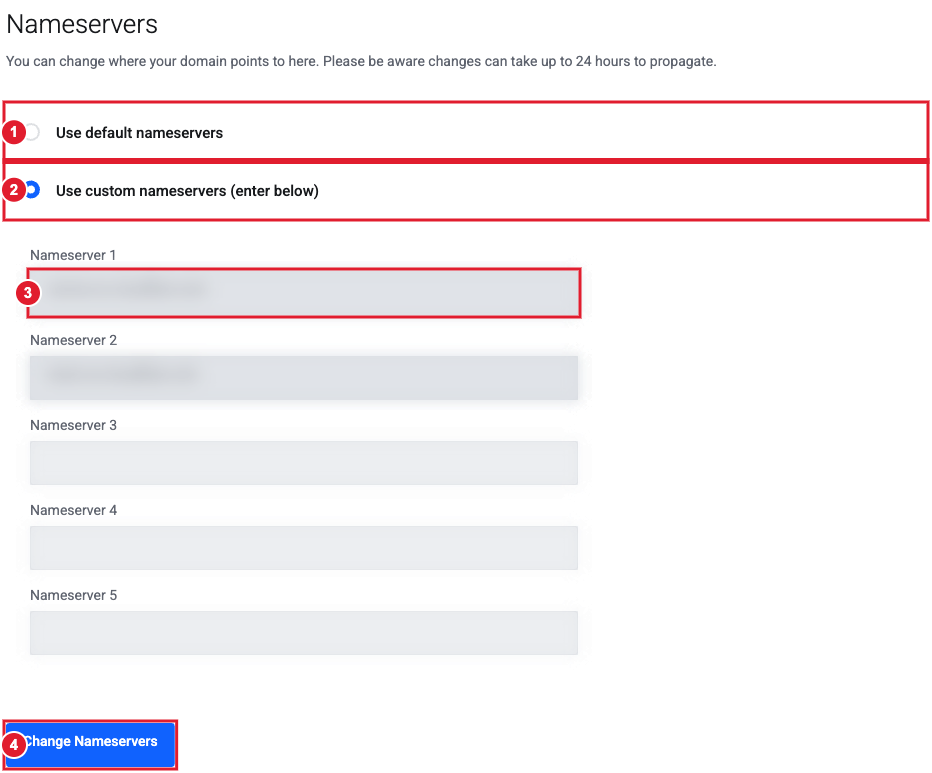
(1) Use our default nameservers (2) Use custom nameservers (3) Enter each nameserver (4) Change Nameservers
Nameserver changes can take up to 24 hours (sometimes 48) to reach everyone. During that time some visitors may still see the old DNS.
Domain registered somewhere else?
Log in where the domain is registered and set its nameservers to dns1.liberationtek.com, dns2.liberationtek.com and dns3.liberationtek.com. To manage the records here, the domain also needs to be set up in our DNS. If DNS Management isn't available for it in your Client Area, open a support ticket.
