
Which webmail?: This article is for the Liberation Mail webmail at mail.liberation.email. It is the main webmail for Email Pro accounts managed in the Client Area, and the backup webmail for Hub for Teams users. If you use the Hub, see Using Hub Email instead.
Hub users: see Email Out of Office (Vacation) auto-response for the Hub version.
To create an out-of-office reply on Liberation Email for your address:
- Open the preferences panel of your mailbox.
- Select “Mail” on the navigation menu.
- Choose “Vacation” that you see at the top of the new interface, to access the email filters settings.
- Tick “Enable vacation auto reply”.
- Choose your settings (fill out the form to meet your needs).
- Save your changes, by clicking on the blue floppy disk icon in the right-hand corner of the page.
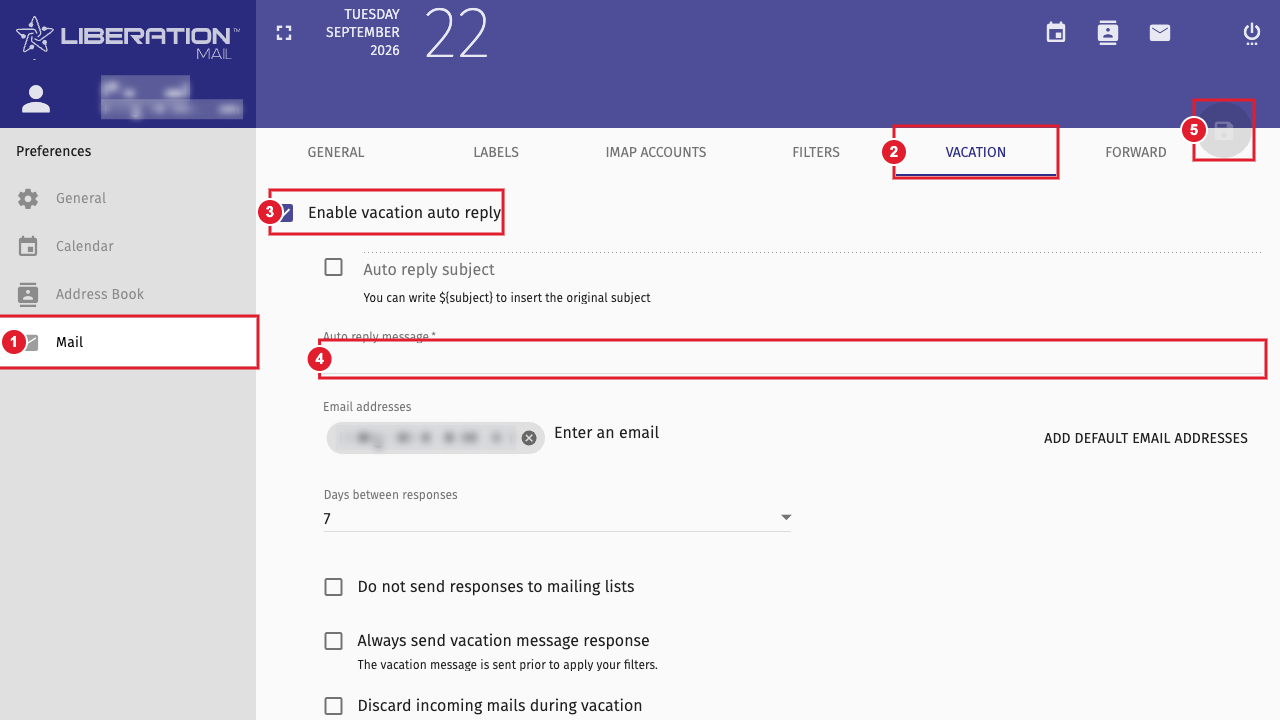
(1) Mail (2) Vacation tab (3) Enable vacation auto reply (4) Your reply message (5) Save
To turn it off, untick Enable vacation auto reply and save again.
