
Which webmail?: This article is for the Liberation Mail webmail at mail.liberation.email. It is the main webmail for Email Pro accounts managed in the Client Area, and the backup webmail for Hub for Teams users. If you use the Hub, see Using Hub Email instead.
You can import contacts from a vCard (.vcf) or LDIF (.ldif) file. Most mail services, including Gmail and Outlook, can export your contacts in one of these formats.
- Sign in at mail.liberation.email and click the Address Book icon at the top right.
- On the left, point to Personal Address Book (or the address book you want) and click its ⋮ menu.
- Click Import.
- Choose the .vcf or .ldif file on your computer and upload it.
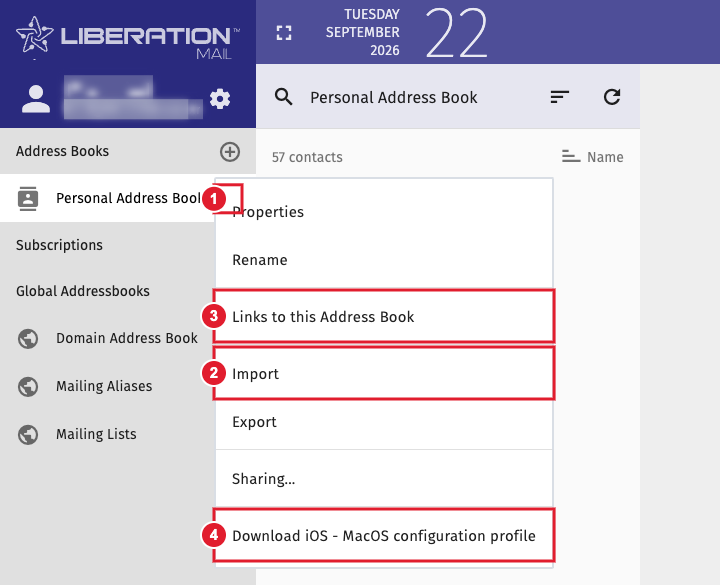
(1) Address book menu (2) Import (3) Links to this Address Book (4) Download a setup profile for iPhone, iPad and Mac
Your contacts appear in the address book when the import finishes. Use Export in the same menu to download a copy of your contacts.
To see these contacts on your phone, see Sync your calendar and contacts to your devices.
