
Which webmail?: This article is for the Liberation Mail webmail at mail.liberation.email. It is the main webmail for Email Pro accounts managed in the Client Area, and the backup webmail for Hub for Teams users. If you use the Hub, see Using Hub Email instead.
Two-factor authentication (2FA) adds a second step when you sign in to the webmail: after your password, you enter a 6-digit code from an app on your phone. Even if someone learns your password, they can't sign in without your phone.
You need an authenticator app on your phone, such as Google Authenticator, Microsoft Authenticator, 2FAS or Aegis.
- Sign in at mail.liberation.email with your full email address and email password.
- Click the gear icon next to your name in the top left to open Preferences.
- With General selected, scroll down and tick Enable two-factor authentication using a TOTP application.
- A QR code appears. Scan it with your authenticator app.
- Type the 6-digit code from the app into Enter TOTP verification code.
- Click the save icon at the top right.
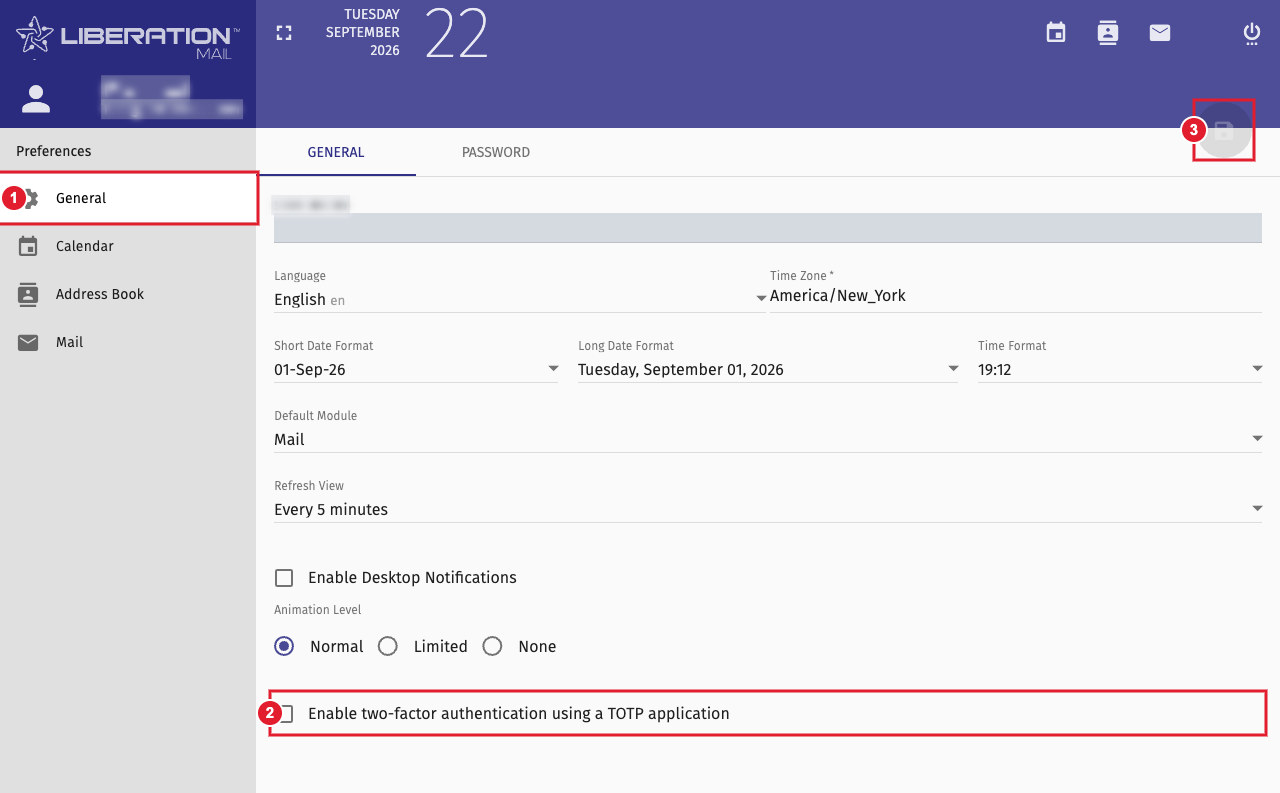
(1) General (2) Turn on two-factor authentication (3) Save
Important: If you lose your phone, you will not be able to sign in to the webmail. Keep your authenticator app backed up, or open a support ticket and we will help you regain access.
2FA applies to the webmail sign-in. Mail apps on your phone and computer keep using your email password.
