
Which webmail?: This article is for the Liberation Mail webmail at mail.liberation.email. It is the main webmail for Email Pro accounts managed in the Client Area, and the backup webmail for Hub for Teams users. If you use the Hub, see Using Hub Email instead.
- Sign in at mail.liberation.email.
- Click the gear icon next to your name in the top left to open Preferences.
- With General selected on the left, click the Password tab.
- Enter your current password, then your new password twice. It must be at least 8 characters.
- Click Change.
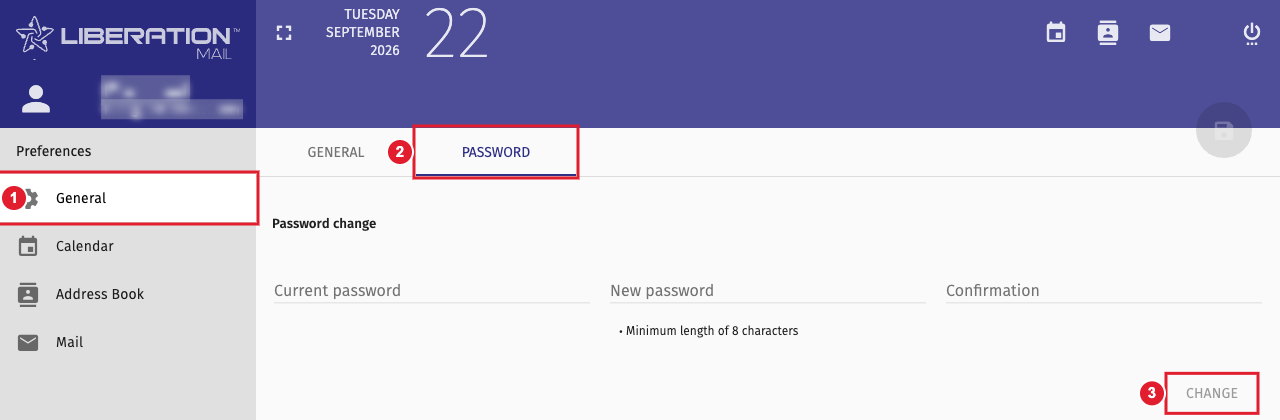
(1) General (2) Password tab (3) Change
Then update the password in the mail apps on your phone and computer, or they will keep asking for it.
Forgot your password?
On the sign-in page at mail.liberation.email, type your full email address, then click Password lost when it appears and follow the steps. If that option isn't available for your mailbox, the account owner can set a new password in the Client Area: open the Email Pro service, click Manage Email Accounts, then the gears icon next to the mailbox. See Email Pro Control Panel: Creating and Managing Email Accounts. Hub users can reset it as shown in How to log in and reset your password.
