
Which webmail?: This article is for the Liberation Mail webmail at mail.liberation.email. It is the main webmail for Email Pro accounts managed in the Client Area, and the backup webmail for Hub for Teams users. If you use the Hub, see Using Hub Email instead.
A signature is added to the bottom of the messages you write. In the Liberation Mail webmail, each identity (From address) has its own signature.
- Sign in at mail.liberation.email.
- Click the gear icon next to your name in the top left to open Preferences.
- Click Mail on the left, then the IMAP Accounts tab.
- Click the pencil next to your account.
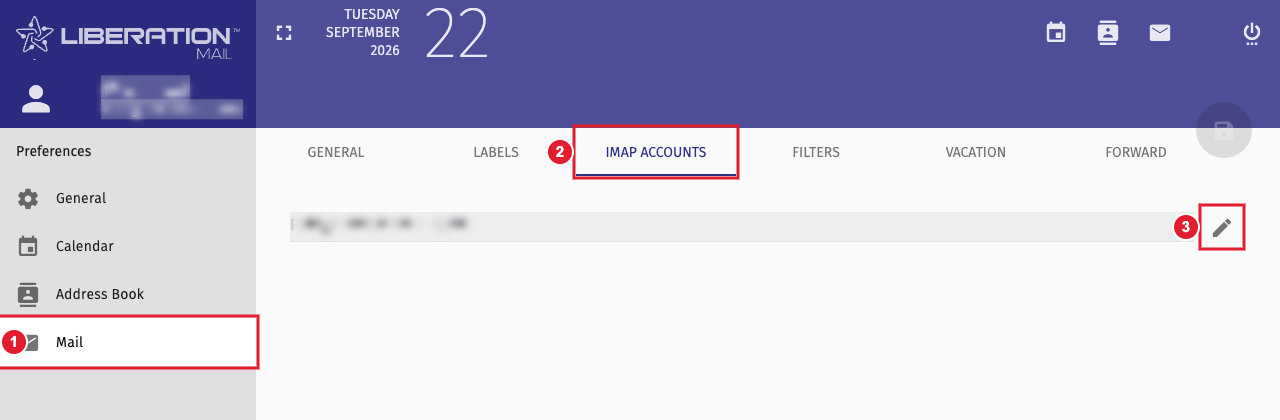
(1) Mail (2) IMAP Accounts tab (3) Edit your account
- Under Identities, click your identity to open it.
- Type your signature in the Signature box. You can add formatting, links and a logo.
- Click OK, then click the save icon at the top right of Preferences.
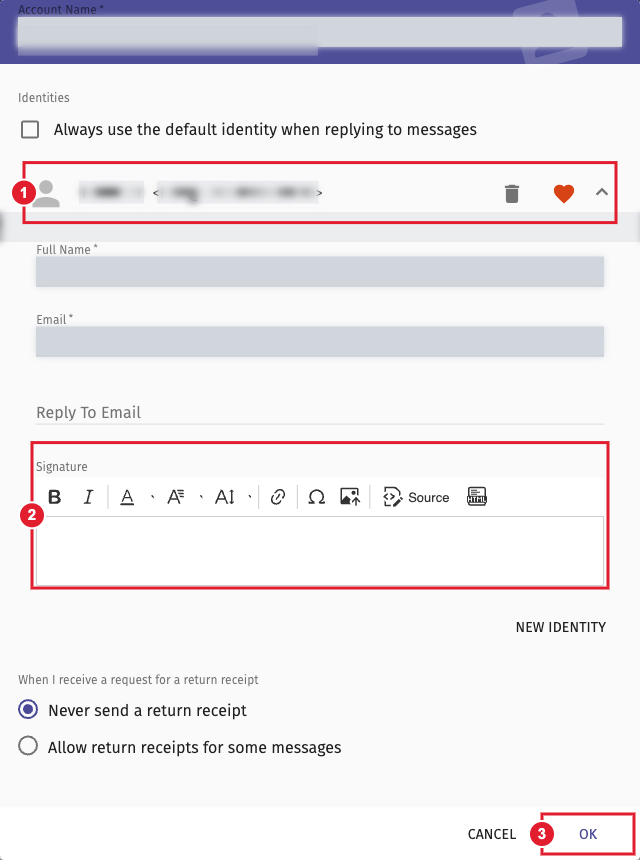
(1) Your identity (2) Signature (3) OK
To choose when the signature is added (new messages, replies, forwards) and whether it goes above or below the quoted text, go to Preferences > Mail > General.
Need another From address? Click New Identity in the same window. See How to Switch Between Identities.
