
Each website on your hosting runs on a version of PHP, the language WordPress and most web apps are written in. You can choose the version for each domain in MultiPHP Manager.
Change the PHP version
- Log in to the Client Area, go to Services > My Services and open your hosting service.
- Click Log in to cPanel in the menu on the left.
- In cPanel, click MultiPHP Manager. You can also type its name into the Search Tools box at the top.
- Tick the box next to the domain you want to change.
- Choose a version in the PHP Version list at the top right.
- Click Apply.
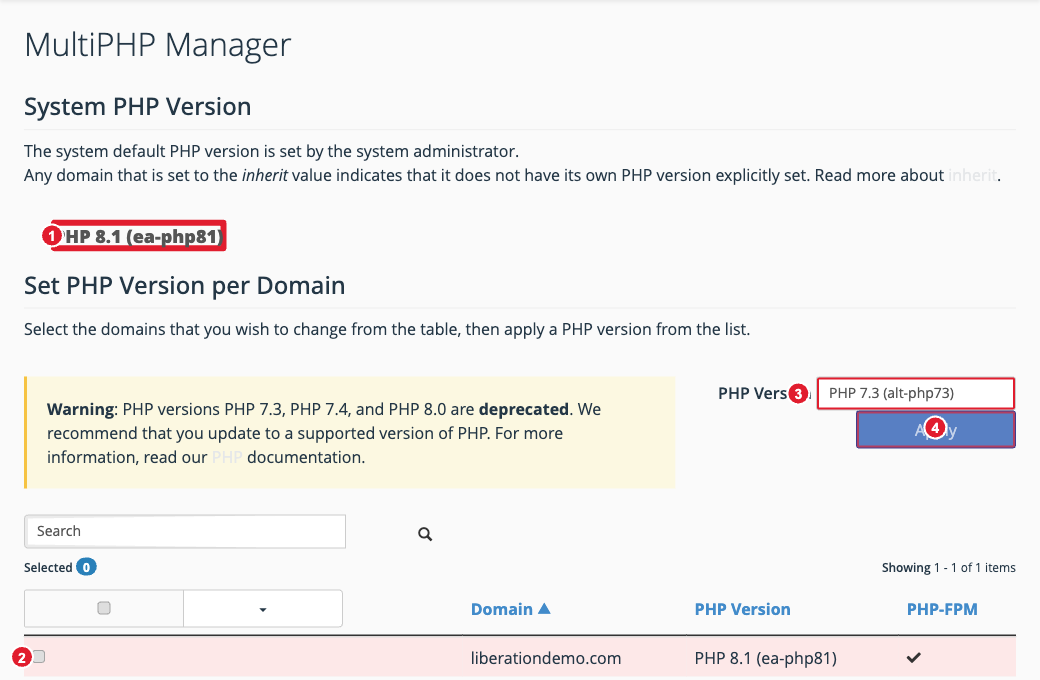
(1) The server default version (2) Tick your domain (3) Choose the PHP version (4) Apply
The change takes effect right away. Check your website afterwards.
Which version should I use?
- Use the newest version your website supports. Newer versions are faster and get security fixes.
- Versions marked deprecated (currently PHP 7.3, 7.4 and 8.0) no longer get security updates. Only use them for an old site that won't run on anything newer, and plan to update it.
- If your site breaks after a change, switch back to the version it was on, then update your site's software, themes and plugins before trying again.
- A domain set to inherit uses the server default shown at the top of the page.
Tip: To change settings such as the memory limit or maximum upload size, see Change PHP Settings (MultiPHP INI Editor).
