
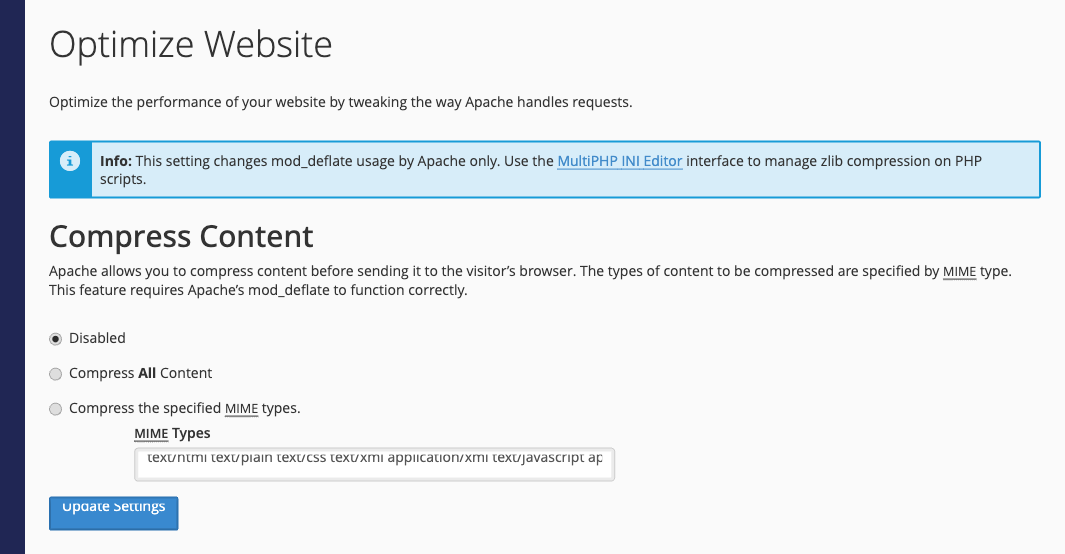
Optimize Website makes the web server compress pages, stylesheets and scripts before sending them, so they load faster. It's off by default.
- Log in to the Client Area, go to Services > My Services and open your hosting service.
- Click Log in to cPanel in the menu on the left.
- In cPanel, click Optimize Website. You can also type its name into the Search Tools box at the top.
- Choose Compress All Content, or Compress the specified MIME types to compress only the types listed (the default list covers HTML, text, CSS, XML and JavaScript).
- Click Update Settings.
Tip: Images, videos and .zip files are already compressed, so compressing them again doesn't help. If your site uses a caching or performance plugin that already compresses output, you can leave this off.
