
Hotlinking is when another website shows your images or files by linking straight to them on your server, which uses your bandwidth. Hotlink Protection blocks this while your own sites keep working.
- Log in to the Client Area, go to Services > My Services and open your hosting service.
- Click Log in to cPanel in the menu on the left.
- In cPanel, click Hotlink Protection. You can also type its name into the Search Tools box at the top.
- Click Enable.
- Check the URLs to allow access box. cPanel fills in your own domains. Add any other site that should be allowed to show your files, one per line.
- In Block direct access for the following extensions, list the file types to protect, for example
jpg,jpeg,gif,png,webp,mp4. - Optionally, enter a URL in Redirect the request to the following URL to send hotlinkers to another image or page.
- Click Submit.
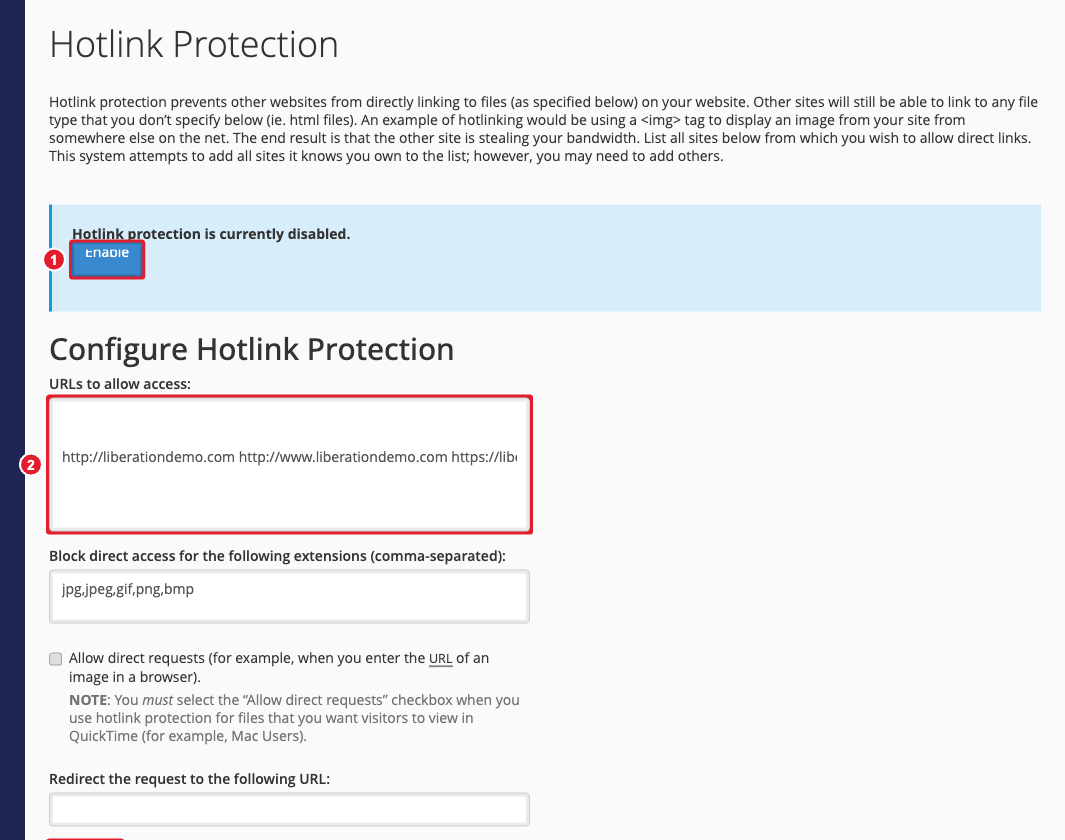
(1) Enable (2) Sites allowed to link to your files
Tip: If images stop showing on your own site after you turn this on, make sure every version of your domain (with and without www, http and https) is in the allowed list.
