
A cron job runs a command or script on a schedule, for example every 15 minutes or once a day. Many apps (WordPress plugins, shop and booking software) ask you to set one up.
- Log in to the Client Area, go to Services > My Services and open your hosting service.
- Click Log in to cPanel in the menu on the left.
- In cPanel, click Cron Jobs. You can also type its name into the Search Tools box at the top.
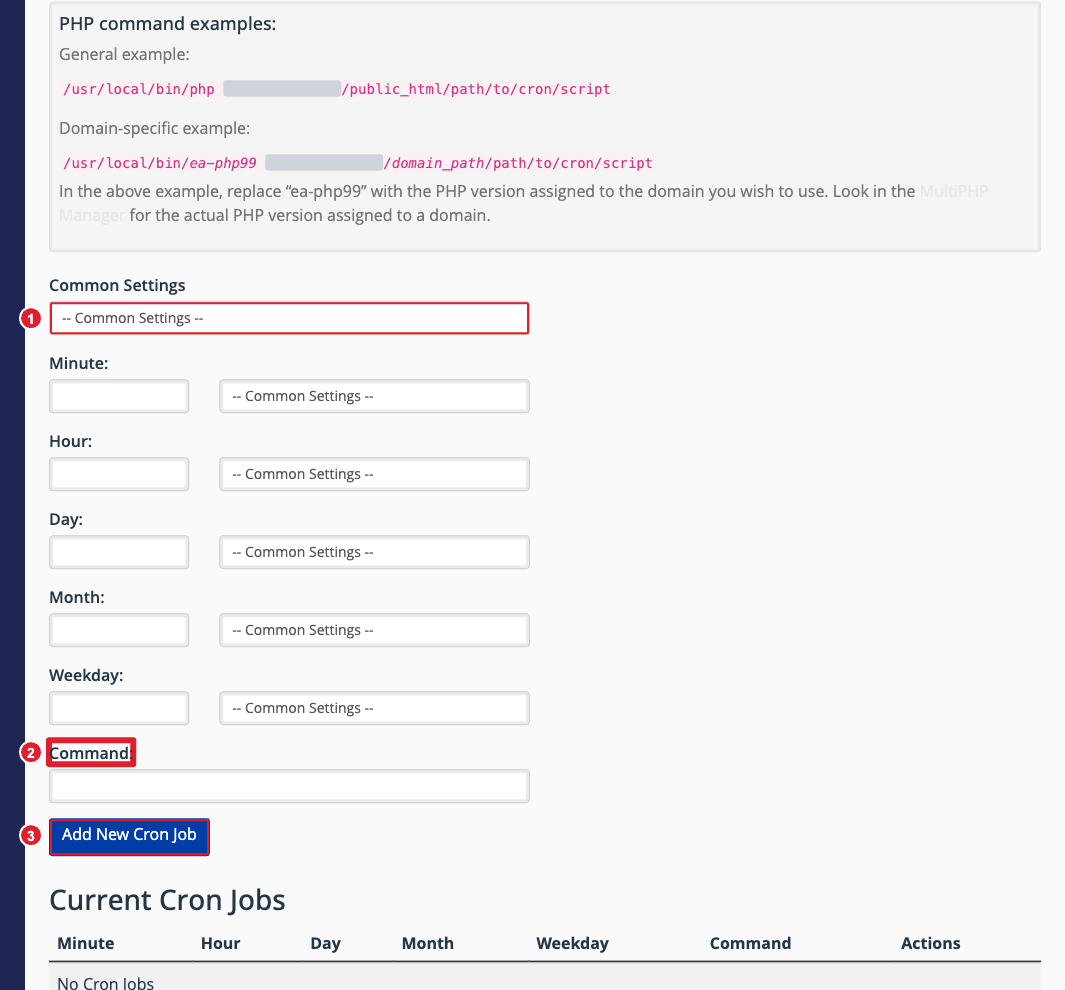
(1) Pick a schedule (2) The command to run (3) Add New Cron Job
Add a cron job
- Under Add New Cron Job, choose a schedule from Common Settings (such as Once Per Hour). This fills in the Minute, Hour, Day, Month and Weekday boxes. You can adjust them by hand.
- In Command, enter what to run. For a PHP script, use the full path, for example:
/usr/local/bin/php /home/yourusername/public_html/cron.php
The PHP command examples on the page show the exact paths for your account. - Click Add New Cron Job.
Cron emails
cPanel can email you the output every time a cron job runs. Enter an address under Cron Email and click Update Email. To stop emails for one job, add >/dev/null 2>&1 to the end of its command.
Change or delete a cron job
Your jobs are listed under Current Cron Jobs. Click Edit to change one or Delete to remove it.
Tip: Don’t run jobs more often than you need. Every 5 or 15 minutes is enough for almost every app.
